
Smart heating control that provides more consistent temperatures, lower energy consumption, and less to worry about.
Ngenic Tune helps your home maintain the right temperature, automatically. The system works in the background and optimizes the heating without requiring you to make any ongoing adjustments.
Many homeowners can relate. Temperatures fluctuate, heat pumps require adjustments, and heating curves are hard to understand.
Ngenic Tune adds an intelligent layer on top of your existing heating system. By analyzing indoor temperature, humidity, sunlight, and weather forecasts, the system learns how your home responds and automatically adjusts the heating. You’ll enjoy a more consistent indoor climate with fewer temperature fluctuations, without having to fine-tune
the heat yourself.
The simple and easy-to-follow installation process lets you quickly get Ngenic Tune up and running at home. The box includes a wireless indoor sensor, a gateway, a control box, and everything you need to complete the installation yourself - in just 20 minutes.
When a home is heated more efficiently, less energy is wasted. This can lead to both lower electricity bills and reduced grid fees.
If you have an hourly electricity rate, Ngenic Tune can automatically shift some of your heating to hours when electricity is cheaper. Together with Ngenic Track, the system can also help reduce power peaks and thereby lower costs for electric utilities that charge power-of-use rates. In the app, you can track your energy usage and see your savings in both kilowatt-hours and
kronor.
The mobile app gives you a complete overview of your home's heating system and lets you easily select your desired temperature. It also includes a variety of smart features.
Smart features available directly through our app, giving you full control over your home's indoor climate.
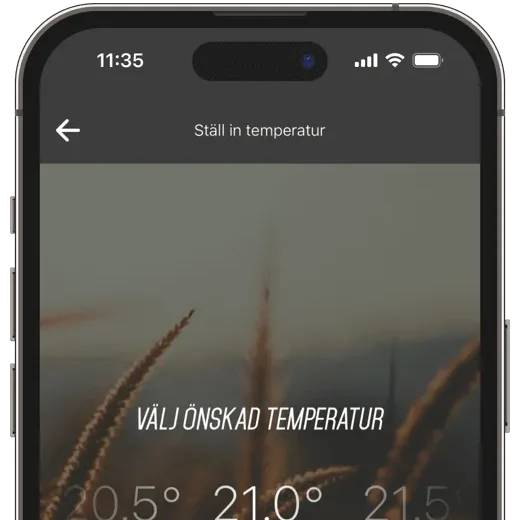
Easily choose the temperature you want in your home. By taking into account the temperature, sunlight, and your home’s heating dynamics, our smart control system ensures you get exactly the temperature you’ve chosen.
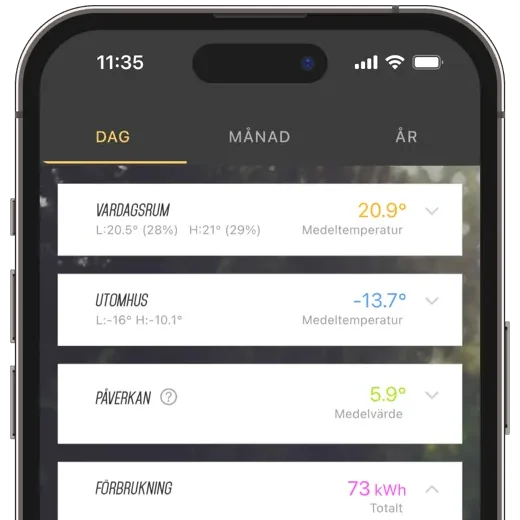
The History view gives you a complete overview of historical data for your indoor and outdoor temperatures, as well as how Ngenic Tune has been controlling them. You can choose whether to filter the graphs by day, month, or year.
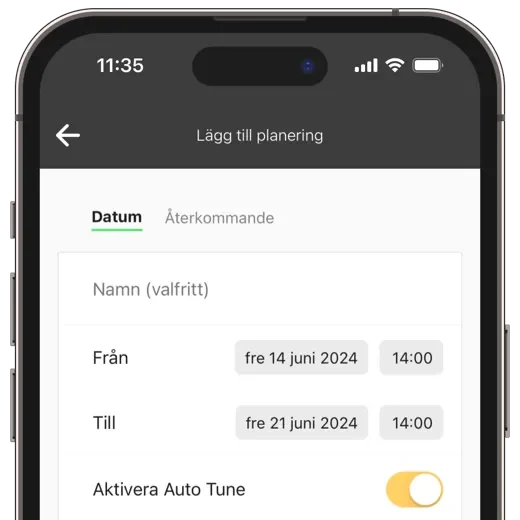
Time for a vacation? If so, you can set a schedule, and Ngenic Tune will lower the temperature while you're away and make sure it's back to normal by the time you return.
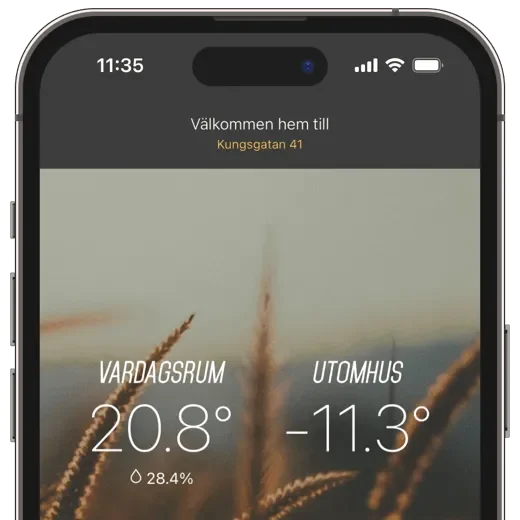
Purchase additional indoor sensors to monitor the temperature in multiple rooms in your home. This also allows you to control the heating based on the average reading from two or more indoor sensors.
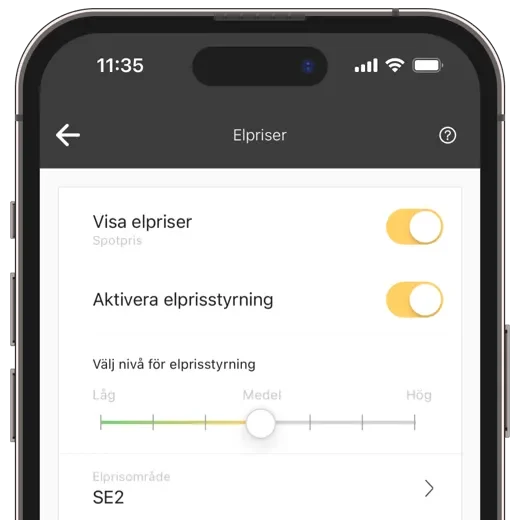
Do you have an electricity plan with an hourly rate? Enable electricity price control, and your electricity usage will be adjusted based on electricity prices, while we aim to maintain a temperature as close as possible to your desired setting.
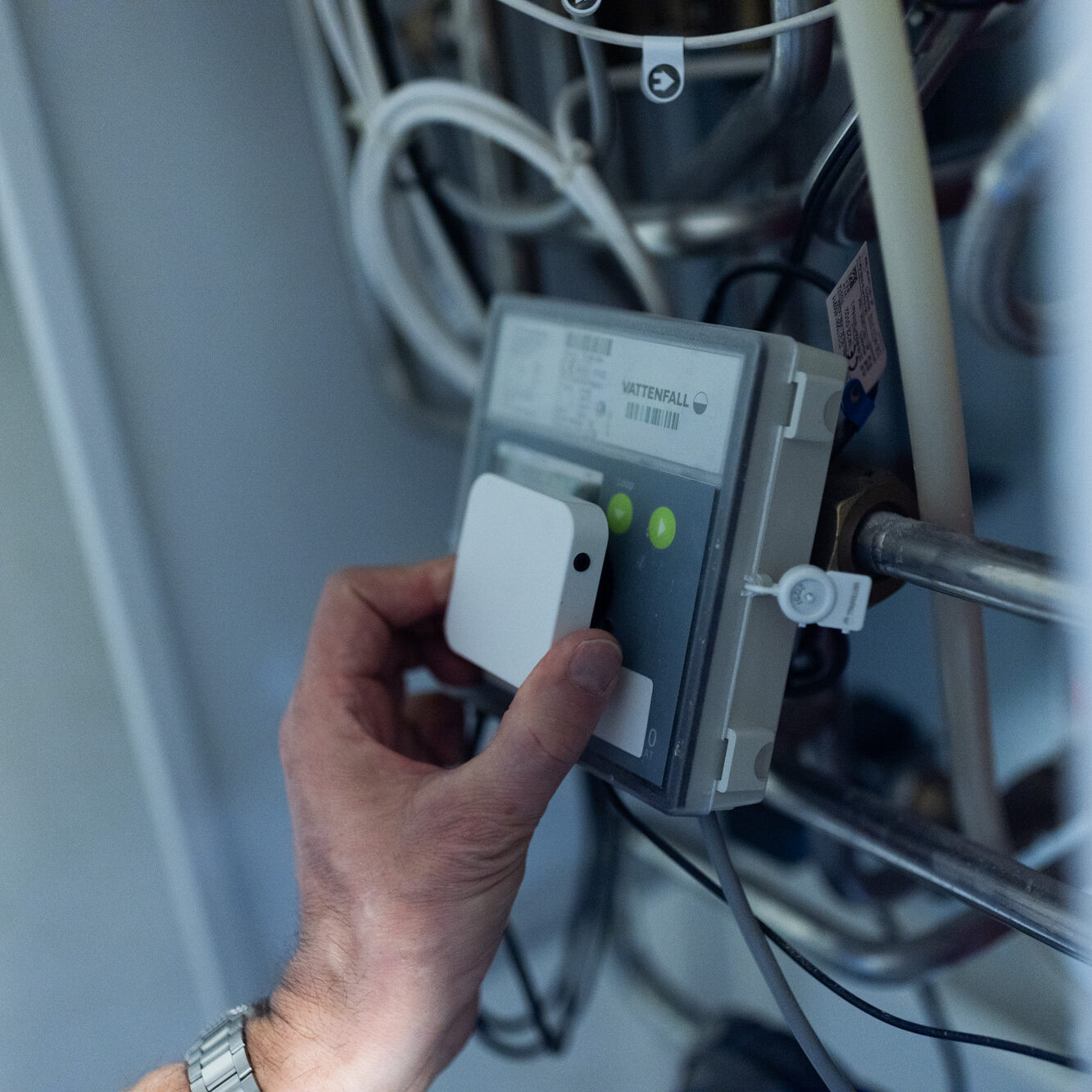
Get started in about 20 minutes. The package includes a wireless indoor sensor, gateway, control box, and everything needed for installation.
When you order Ngenic Tune, you get access to both hardware and services as part of a subscription.
The hardware package includes a wireless indoor sensor, a gateway, a control box, and everything you need to get started. It also includes wire cutters.
The subscription also includes the app, ongoing updates, support, and access to the service's features.
The hardware is loaned as part of the subscription and is owned by Ngenic Energi.
Ngenic Tune is compatible with the vast majority of water-based heating systems. Take our test to see if your
heating system is compatible with Ngenic Tune. If you have an air-air heating pump, our Ngenic AirPatrol solution is compatible.
It varies depending on the size of your home and your existing heating system. Have
calculate your potential savings based on information about your home and heating system here:
Ngenic Tune controls the system by affecting the outdoor temperature measured by the heating system, so that the heating system perceives a different outdoor temperature than the actual one. On some heating systems, this fictitious outdoor temperature may appear on the heating system's display.
With multiple indoor sensors, Ngenic Tune can control the heat in your home even better! You choose which indoor sensors to include in the control system, and Ngenic Tune then adjusts the home’s heat based on the average reading from those sensors. Why not have an indoor sensor on every floor or in a few select rooms? You’ll also have full access to the history in the mobile app, which can be useful for balancing the heat between different parts of the house using thermostats or underfloor heating controls.
The system controls the heating based on the following input parameters: indoor temperature, desired temperature, current outdoor temperature, projected outdoor temperature, solar radiation, the price of electricity, and the dynamics of the house and the heating system.
Optimization for electricity pricing is available only to customers who enable it themselves in the Ngenic Tune app and is suitable if you have an electricity retail contract with hourly electricity rates.
You can always start with one indoor sensor and purchase additional ones later! With additional
indoor sensors, you can get a better picture of the temperature in your home. You can choose which indoor sensors to include in the control system yourself in the app. Ngenic Tune can then adjust the system based on an
average reading from these sensors. One indoor sensor is included in the subscription.
To ensure that Ngenic Tune works as well as possible when you have a fireplace, you should position your indoor sensor correctly. A good rule of thumb is to keep the indoor sensor in a different room or at least five meters away from the fireplace to prevent it from getting too hot. This ensures that Ngenic Tune can provide more accurate temperature control without being overly affected by the heat from the fireplace.
The extent to which our customers want the heat from the heating system to be reduced while the fireplace is in use can vary from person to person. It depends largely on whether the fireplace is being used to save electricity, for example, or simply for comfort. You can adjust this yourself by varying the distance between the indoor sensor and the fireplace.
In addition, by adding extra indoor sensors in different rooms, Ngenic Tune can better understand and balance the heating throughout your home. This is particularly beneficial in large homes, where certain rooms may become too cold a few hours after the fire is lit. With multiple indoor sensors, the system can adjust the heat based on an even more accurate representation of the home’s temperature.
No, there is no minimum contract term. The subscription works just like a regular
streaming service - you pay in advance for the period you choose (month or year), and you can cancel at any time. You’ll retain access to the service for the entire paid period, with
out any extra fees or notice periods.
No, you usually don't need to change the heating curve. It's best if it's set at a level that's just right for your house.
If you've previously turned down the heat using radiator thermostats or underfloor heating controls, it might be a good idea to open them and then lower the heating curve slightly.
When using Ngenic Tune, it’s best to start with the radiator thermostats and floor heating set to the maximum, and then simply lower the temperature in the rooms you want to be a little cooler. This is more important for heat pumps than for district heating systems.
Tips for those of you who have been using Ngenic Tune for a while:
Check the history for the "Impact" metric for the monthsof November through March.
"Impact" is a value that indicates how Ngenic Tune adjusts your thermostat. If the values are positive, it means the controller should “slow down,” that is, send water at a lower temperature to the radiators. Negative values, on the other hand, mean it should heat a little extra. The outdoor temperature that your heating system “thinks” it is—that is, the temperature outside—is the sum of the measured temperature and the “impact.”
The best way to start using radiator thermostats and underfloor heating controls is to set them to the fully open position - that is, to maximum flow. If you’ve previously had the thermostats turned down, you may need to adjust the heating curve on your system slightly downward.
Open flow is particularly important for heat pumps, which prefer high flow and lower temperatures, but this recommendation also applies to other heating systems, including district heating. If certain areas of your home tend to get too hot, you can make minor adjustments in those areas to balance the heat throughout the house.
After installing Ngenic Tune, you don’t need to be as strict with your heating curve settings. Despite this, we recommend that you keep most thermostats and underfloor heating controls set to their highest settings. After that, you can make minor adjustments in areas that feel too warm, but for the most part, you should keep them open in most areas of your home. It’s important not to restrict the flow near Ngenic Tune’s indoor sensor.
When making changes, we recommend that you take breaks between each adjustment and make small changes at a time.
Cutting the cable to the outdoor sensor may sound drastic, but it’s actually the method we recommend for easy integration with your heating system. With our solution, you don’t need to delve deeply into your heating system. Plus, if you ever decide to stop using Ngenic Tune, it’s easy to restore everything to its original state.
Typically, the cable for the outdoor sensor is white or gray, thin, and is located either on the back or top of the heating system. The cable should run into a wall or up into a ceiling, ultimately leading to the outdoor sensor, which is usually located on an exterior wall on the north side of the house.
For best results, cut the cable close to the heating system, preferably within a 3-meter radius. Remember that the control box should be kept indoors.
If you'd rather not cut the cable, you can follow these steps using our Y-cable:
All set! Now you can turn the heating system back on. If all the connections are correct, you should be able to see the outdoor temperature on your heating system's display, if you have one.
We use cookies and similar technologies to improve your experience, analyze our traffic, and deliver personalized content. Some cookies are necessary for the website to function, while others are optional. By clicking "Accept All," you consent to our use of all cookies. You can also choose to customize your preferences or opt out of optional cookies using the buttons below. Learn more in our Privacy Policy and Cookie Policy. Privacy Policy Cookie Policy